Model LU740 LED Wash ZoomEdition EN · 04 / 2026 · V1Dokument-Nr. LU740-EN-01
Wash Zoom Moving Head
LU740
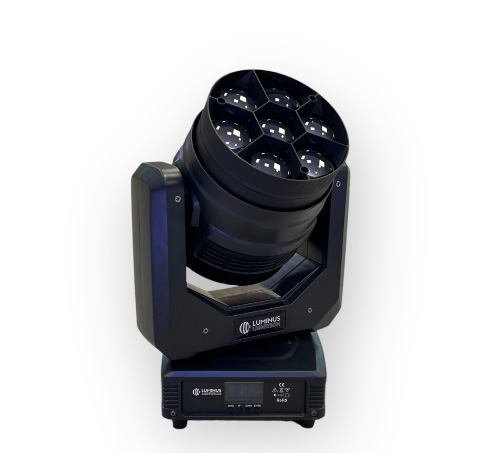
Wash zoom moving head with 7 × 40 W RGBW 4-in-1 LEDs, motorized linear zoom, color temperature presets from 2800 K to 8000 K and two channel modes
Operating manual. Please read in full before first use and keep for future reference.
Light source
7 × 40 WRGBW 4-in-1
Zoom
6° – 45°motorized
DMX channels
17 / 222 channel modes
IP rating
IP20Indoor
Luminus LU740Foreword · About this document
Foreword
00Welcome
Thank you for choosing the Luminus LU740 LED Wash Zoom Moving Head — a wash moving head with 7 × 40 W RGBW 4-in-1 LEDs, a motorized linear zoom system, outstanding color macro effects and fast, quiet, flicker-free operation.
The product has full capability and intact packing when leaving the factory. All users should comply with the warnings and this manual. Any damage caused by misuse is not included in our guarantee, and we cannot be responsible for any malfunction or problem owing to ignoring the manual.
Please keep this user guide for future consultation. If you sell the unit to another user, be sure that they also receive this instruction booklet.
Earthing MandatoryIt is important to ground the yellow/green conductor to earth in order to avoid electric shock. Do not touch any wire during operation as high voltage might cause electric shock. Disconnect main power before replacement or servicing.
Unpack and check carefully that there is no transportation damage before using the unit.
Before operating, ensure that the voltage and frequency of the power supply match the power requirements of the unit.
The unit is for indoor use only. Use only in a dry location.
The unit must be installed in a location with adequate ventilation, at least 50 cm from adjacent surfaces. Be sure that no ventilation slots are blocked.
Make sure there are no flammable materials close to the unit while operating, as it is a fire hazard.
Use a safety cable when fixing this unit. Do not handle the unit by taking its head only, but always by taking its base.
Maximum ambient temperature is Ta: 40 °C. Do not operate where the temperature is higher than this. Unit surface temperature may reach up to 85 °C. Do not touch the housing bare-handed during operation. Turn off the power and allow about 15 minutes for the unit to cool down before replacing or servicing.
In the event of a serious operating problem, stop using the unit immediately. Never try to repair the unit yourself — repairs carried out by unskilled people can lead to damage or malfunction. Please contact the nearest authorized technical assistance center and always use the same type of spare parts.
WarningTo prevent or reduce the risk of electrical shock or fire, do not expose the unit to rain or moisture. Do not open the unit within five minutes after switching off. The housing, the lenses, or the ultraviolet filter must be replaced if they are visibly damaged. There are no user-serviceable parts inside the unit.
1.1Installation
The unit should be mounted via its screw holes on the bracket. Always ensure that the unit is firmly fixed to avoid vibration and slipping while operating. The structure to which the unit is attached must be able to support The mounting point must safely bear the weight of the fixture; the fixture must additionally be secured with a suitable safety cable of sufficient load rating in accordance with local regulations and laws. The equipment must be fixed by professionals and must be installed out of the reach of people.
Luminus LU74002 · Technical Specifications
Chapter 02
02Technical Specifications
Light Source & Optics
Light source
7 × 40 W RGBW 4-in-1 LED
Optics
7 × high-efficiency acrylic lens
Beam angle
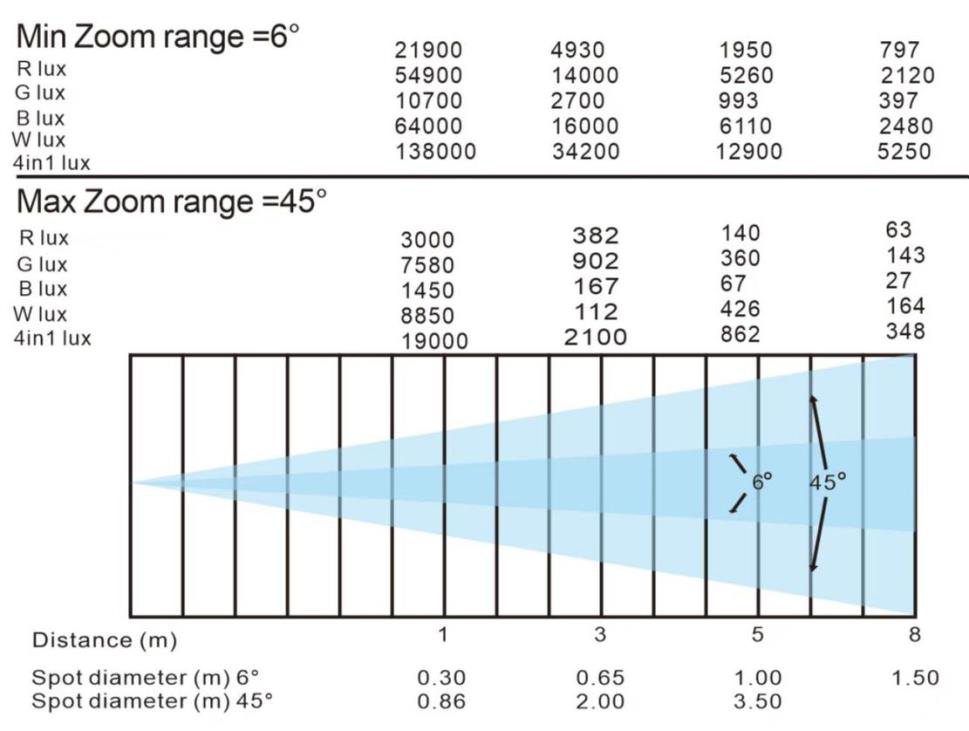
6° – 45° (datasheet: 5°–45° zoom)
Zoom
Motorized linear zoom system
Color mixing
Additive RGBW, color macros, color temperatures 2800 K – 8000 K
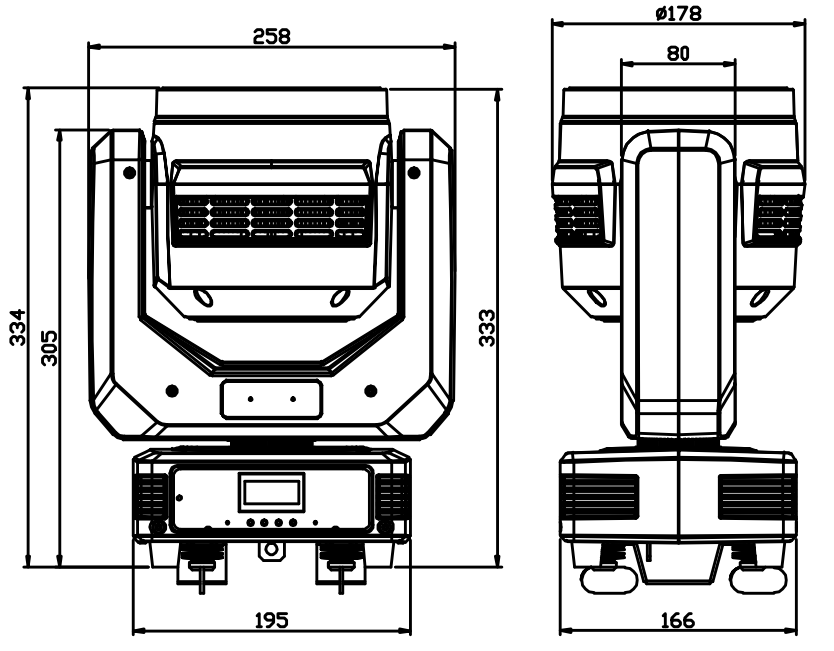
Flight case (6 in 1) 910 × 570 × 550 mm · carton (1 in 1) 310 × 230 × 420 mm
DimensionsPhotometric data and zoom range
Luminus LU74003 · How to Control the Unit
Chapter 03
03How to Control the Unit
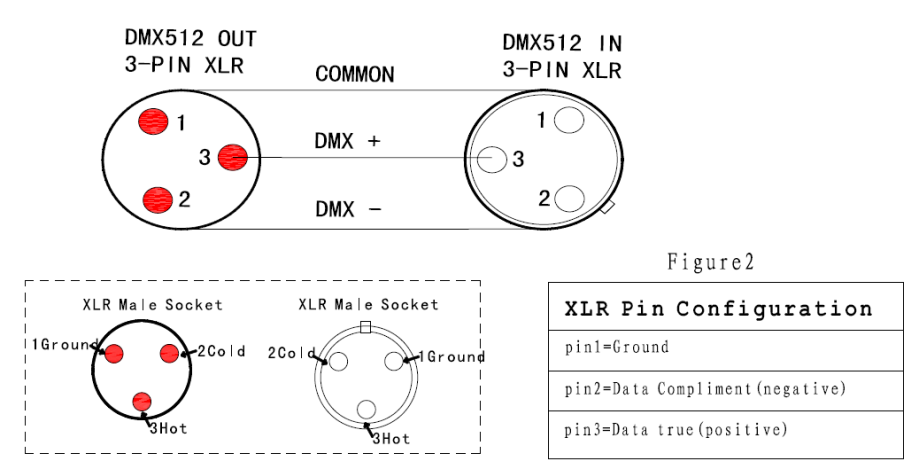
DMX-512 is widely used in intelligent lighting control. With a DMX-512 controller, several fixtures are connected in series via DMX in and DMX out.
Pin
Assignment (3-pin XLR)
Pin 1
GND
Pin 2
Negative signal (−)
Pin 3
Positive signal (+)
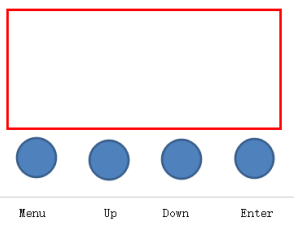
3.1Button Functions
Button
Function
MENU
To select the programming functions
DOWN
To go backward in the selected functions
UP
To go forward in the selected functions
ENTER
To confirm the selected functions
Set DMX address code: Press "MENU" to Set DMX Address and press "ENTER" to enter. The display shows "Set DMX Address — DMX Address:001"; amend the value with the "UP" and "DOWN" keys. "ENTER" saves and exits, "MENU" exits without saving.
DMX connector pinoutControl panel: MENU · UP · DOWN · ENTER
Luminus LU74003.1 · Display and Menu
3.2Menu Structure
No.
Menu item
Options / description
1
Address
Address setting 001–512
2
Mode
DMX512 console control · Auto (master / alone) · Sound (master / alone) · Manual — direct control of pan, tilt, focus (zoom), red, green, blue, white and strobe (0–255 each)
3
Channel
17CH · 22CH
4
Invert
Pan invert NO/YES · tilt invert NO/YES
5
Sound
Sound sensitivity 0–100
6
Degree
Pan range 540° or 360°
7
No Signal
Black out · hold
8
Fan Set
Auto · High · Low
9
Reset
NO · YES
10
Default
Factory setting (yes / no)
11
Inform
Soft version number · Temp temperature of the LED board
12
Adjust
Password protected. Fine control of pan, tilt and focus (zoom) as well as the base values for red, green, blue and white (0–255 each)
Luminus LU74004.1 · 17-Channel Mode
Chapter 04
04DMX Channel Charts
4.117-Channel Mode
CH
Function
Description
Value
01
Pan adjustment
Pan adjustment
000–255
02
Pan fine adjustment
Pan fine adjustment
000–255
03
Tilt adjustment
Tilt adjustment
000–255
04
Tilt fine adjustment
Tilt fine adjustment
000–255
05
Speed of pan/tilt
from fast to slow
000–255
06
Strobe
Turn on the light
000–003
Synchro strobe speed, slow to fast (1 Hz – 25 Hz)
004–203
Random strobe
204–255
07
Dimmer
from dark to bright
000–255
08
Dimming mode
Mode 1
000–049
Mode 2
050–099
Mode 3
100–149
Mode 4
150–255
09
Zoom
from near to far
000–255
10
R
from dark to bright
000–255
11
G
from dark to bright
000–255
12
B
from dark to bright
000–255
13
W
from dark to bright
000–255
14
Static color
000–255 · see chapter 4.3
000–255
15
Moving color
No function
000–049
Skip change
050–099
Gradual change
100–255
16
Speed of moving color
from fast to slow
000–255
17
Reset
No function
000–250
Reset
251–255
Luminus LU74004.2 · 22-Channel Mode (1/2)
4.222-Channel Mode (channel 1–17)
Compared to the 17-channel mode, the 22-channel mode adds fine channels for the dimmer and all four colors, and places zoom ahead of the dimmer.
CH
Function
Description
Value
01
Pan adjustment
Pan adjustment
000–255
02
Pan fine adjustment
Pan fine adjustment
000–255
03
Tilt adjustment
Tilt adjustment
000–255
04
Tilt fine adjustment
Tilt fine adjustment
000–255
05
Speed of pan/tilt
from fast to slow
000–255
06
Zoom
from near to far
000–255
07
Dimmer
from dark to bright
000–255
08
Dimming fine adjustment
Dimming adjustment control
000–255
09
Strobe
No function
000–003
Synchro strobe speed, slow to fast (1 Hz – 25 Hz)
004–203
Random strobe
204–255
10
R
from dark to bright
000–255
11
Red fine adjustment
Red fine adjustment
000–255
12
G
from dark to bright
000–255
13
Green fine adjustment
Green fine adjustment
000–255
14
B
from dark to bright
000–255
15
Blue fine adjustment
Blue fine adjustment
000–255
16
W
from dark to bright
000–255
17
White fine adjustment
White fine adjustment
000–255
Luminus LU74004.2 · 22-Channel Mode (2/2)
4.222-Channel Mode (channel 18–22)
CH
Function
Description
Value
18
Dimming mode
Mode 1
000–049
Mode 2
050–099
Mode 3
100–149
Mode 4
150–255
19
Static color
000–255 · see chapter 4.3
000–255
20
Moving color
No function
000–049
Skip change
050–099
Gradual change
100–255
21
Speed of moving color
from fast to slow
000–255
22
Reset
No function
000–250
Reset
251–255
Luminus LU74004.3 · Static Colors & Color Temperatures
The first ranges describe continuous color transitions: ↑ means the color value rises across the range, ↓ means it falls. The upper ranges from value 196 recall fixed color temperature presets from 2800 K to 8000 K.
DMX value
Color / transition
000–015
No function
016–035
R 100 % · G ↑ · B 0 %
036–055
R ↓ · G 100 % · B 0 %
056–075
R 0 % · G 100 % · B ↑
076–095
R 0 % · G ↓ · B 100 %
096–115
R ↑ · G 0 % · B 100 %
116–135
R 100 % · G ↑ · B ↓
136–155
R 100 % ↓ · G ↑ · B ↑
156–175
R ↓ · G ↓ · B 100 %
176–195
R 100 % · G 100 % · B 100 % · W 100 %
DMX value
Color temperature
196–200
2800 K
201–205
3200 K
206–210
4000 K
211–215
4500 K
216–220
5000 K
221–225
5600 K
226–230
6500 K
231–235
7000 K
236–240
7500 K
241–255
8000 K
Moving Color
DMX value
Function
000–049
No function
050–099
Skip change
100–255
Gradual change
The run speed of the moving color is controlled via channel 16 (17-CH mode) or channel 21 (22-CH mode) — 000 fast to 255 slow.
Luminus LU74005 · Trouble Shooting
Chapter 05
05Trouble Shooting
Following are a few common problems that may occur during operation, with suggestions for easy troubleshooting.
A. The unit does not work, no light and the fan does not work
Check the connection of power and the main fuse.
Measure the mains voltage on the main connector.
Check the power-on LED.
B. Not responding to the DMX controller
The DMX LED should be on. If not, check DMX connectors and cables to see if they link properly.
If the DMX LED is on and there is no response on the channel, check the address settings and DMX polarity.
If you have intermittent DMX signal problems, check the pins on the connectors or on the PCB of this unit or the previous one.
Try to use another DMX controller.
Check whether the DMX cables run near or alongside high-voltage cables, which may cause damage or interference to the DMX interface circuit.
C. One of the channels is not working well
The stepper motor might be damaged or the cable connected to the PCB is broken.
The motor drive IC on the PCB might be out of condition.
Luminus LU74006 · Fixture Cleaning
Chapter 06
06Fixture Cleaning
The cleaning of internal and external optical lenses and/or mirrors must be carried out periodically to optimize light output. Cleaning frequency depends on the environment in which the fixture operates: damp, smoky or particularly dirty surroundings can cause greater accumulation of dirt on the optics.
Clean with a soft cloth using normal glass cleaning fluid.
Always dry the parts carefully.
Clean the external optics at least every 20 days.
Clean the internal optics at least every 30/60 days.
Disconnect from Mains before CleaningThere are no user-serviceable parts inside the unit. Do not open the housing or attempt any repairs yourself. In the unlikely event your unit requires service, please contact your nearest dealer.
Luminus LU740— · CE Compliance Notice
Appendix
—CE Compliance Notice
The manufacturer declares under its sole responsibility that the LU740 complies with the relevant EU harmonization legislation.
EU Declaration of Conformity
A signed EU Declaration of Conformity exists for this product. It is not part of this manual and can be requested from us at any time — by email to verkauf@lexvision.de or by phone on +49 (0) 651 14567727, stating the product designation.
The signed EU Declaration of Conformity for this product is available upon request from F. & M. Vertrieb GmbH, Waldweg 26, 54636 Sefferweich, Germany.